
GraphQL API
Salsa’s GraphQL API
Our GraphQL API powers the entirety of our UI experiences, and we are expanding and adding more functionality to it every day. While the specific schema of the types will likely change as we roll this out wider in the coming months, you can access our current API and explore its schema and capabilities.
If you are new to GraphQL, we recommend checking out this guide with basic concepts
Endpoint
Sandbox environment: https://api.sandbox.salsa.dev/api/graphql
Authorization
Our GraphQL API can be accessed using an API Token or a User Token. See the documentation on Authorization for details.
Api Limits
We use a traditional depth + complexity score to grade api requests and reject requests the violate this score. We may vary this over time, and assign specific weighting to some more expensive entities.
| Metric | Limit |
|---|---|
| Max Query Depth | 15 |
| Max Query Complexity | 700 |
These are calculated with the follow base weights;
- Complexity per scalar field - 1
- Complexity per list field - 10
Exploring the API
By specifying the endpoint and authorization header you can use whatever preferred GraphQL IDE that you like to explore our API’s schema and execute operations. However, if you do not have one setup already, you can use Apollo’s sandbox Explorer on the web to try it out.
Browse the API in Apollo sandbox Explorer
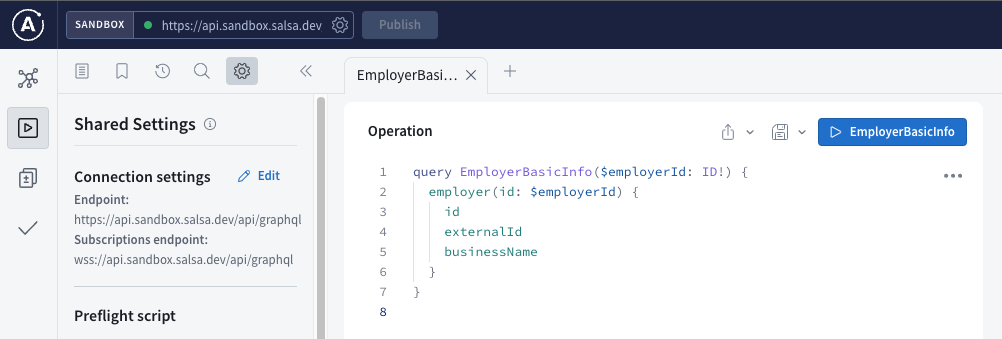
1. Open this link for Salsa’s Sandbox environment
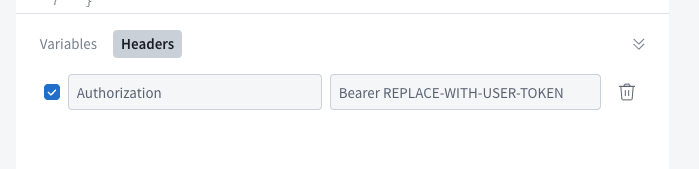
2. Expand the request Headers section at the bottom and replace the placeholder text with a User Token created or your API Token if you are calling from your backend
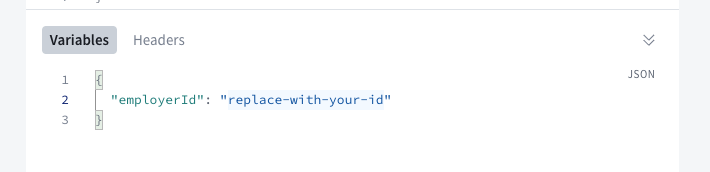
3. To run this particular query for an employer’s data, expand the variables and enter the employer id that this User Token has access to, or your API Token
4. Execute the query!
You can now explore the API’s schema and experiment with operations as you please.
Sample Operations
While we encourage you to explore the API on your own as much as you’d like, we believe having some sample operations illustrating common use cases can greatly help to jumpstart your exploration. For each sample operation below you need only specify the required variables in order to try them out.
Queries
Fetch basic employer information
query EmployerBasicInfo($employerId: ID!) {
  employer(id: $employerId) {
    id
    externalId
    businessName
  }
}
Get an employer’s details
query EmployerDetails($employerId: ID!) {
  employer(id: $employerId) {
    id
    externalId
    businessName
    workLocations {
      id
      address {
        ...AddressFields
      }
    }
    workerPayGroups {
      id
      name
    }
    ...EmployerTaxesSetups
  }
}

fragment AddressFields on Address {
  addressLine1
  administrativeArea
  locality
  postalCode
}

fragment EmployerTaxesSetups on Employer {
  taxesSetupByJurisdiction {
    jurisdiction {
      name
    }
    taxIdentifiers {
      type {
        name
      }
      value
    }
  }
}
List the workers of an employer
query SimpleWorkersList($employerId: ID!) {
  employer(id: $employerId) {
    id
    workers {
      ...WorkerBasicInfo
    }
  }
}

fragment WorkerBasicInfo on Worker {
  id
  externalId
  firstName
  lastName
  displayName
}
Get a worker’s details
query WorkerDetails($workerId: ID!) {
  worker(id: $workerId) {
    ...WorkerBasicInfo
    personalInformation {
      dateOfBirth
      gender {
        name
      }
      homeAddress {
        address {
          ...AddressFields
        }
      }
    }
    taxesSetupByJurisdiction {
      jurisdiction {
        name
      }
      taxAllowances {
        type {
          name
        }
        value
      }
      additionalTaxWithholdings {
        type {
          name
        }
        value
      }
    }
  }
}

fragment WorkerBasicInfo on Worker {
  id
  externalId
  firstName
  lastName
  displayName
}

fragment AddressFields on Address {
  addressLine1
  administrativeArea
  locality
  postalCode
}
List the payslips of a worker
query WorkerPayslips($workerId: ID!) {
  worker(id: $workerId) {
    ...WorkerBasicInfo
    payslips {
      id
      payDate
      payPeriod {
        period {
          start
          end
        }
      }
      grossPay
      netPay
    }
  }
}

fragment WorkerBasicInfo on Worker {
  id
  externalId
  firstName
  lastName
  displayName
}
Get a payslip’s details
query PayslipDetails($employeePayslipId: ID!) {
  employeePayslip(id: $employeePayslipId) {
    id
    employeeDetails {
      worker {
        id
      }
      displayName
    }
    payDate
    payPeriod {
      period {
        start
        end
      }
    }
    grossPay
    netPay
    totals {
      totalCompensations {
        ...PayslipAmountsFragment
      }
      totalNonTaxDeductions {
        ...PayslipAmountsFragment
      }
      totalTaxDeductions {
        ...PayslipAmountsFragment
      }
      totalNonTaxContributions {
        ...PayslipAmountsFragment
      }
      totalTaxContributions {
        ...PayslipAmountsFragment
      }
    }
    pay {
      description
      amounts {
        ...PayslipAmountsFragment
      }
    }
    nonTaxDeductions {
      description
      amounts {
        ...PayslipAmountsFragment
      }
    }
    taxDeductions {
      description
      amounts {
        ...PayslipAmountsFragment
      }
    }
    nonTaxContributions {
      description
      amounts {
        ...PayslipAmountsFragment
      }
    }
    taxContributions {
      description
      amounts {
        ...PayslipAmountsFragment
      }
    }
  }
}

fragment PayslipAmountsFragment on PayslipAmounts {
  amount
  ytdAmount
}
Get a payroll run’s details
query PayrollRunDetails($payrollRunId: ID!) {
  payrollRun(id: $payrollRunId) {
    id
    status
    payPeriod {
      payDate
      period {
        start
        end
      }
    }
    workerPayrollRuns {
      id
      worker {
        displayName
      }
      ... on WorkerPayrollRunInclusion {
        results {
          totals {
            grossPay
            netPay
            contribution
            payrollCost
          }
        }

        elements {
          pay {
            description
            amount
            amountStrategy {
              ... on FixedAmountStrategy {
                amount
              }
              ... on FrequencyBasedStrategy {
                frequency
              }
              ... on RateBasedStrategy {
                multiplier
                rate
                rateUnit
                rateUnitAmount
              }
            }
          }
          deductions {
            amount
            description
          }
          timeOffAccrued {
            typeId
            money {
              amount
            }
            time {
              amount
            }

          }
        }
      }
    }
  }
}
List the payslip PDF documents in a payroll run
query PayrollRunPayslipDocuments($payrollRunId: ID!) {
  payrollRun(id: $payrollRunId) {
    id
    workerPayrollRuns {
      id
      worker {
        displayName
      }
      ... on WorkerPayrollRunInclusion {
        payslip {
          document {
            id
            mediaType
            status
          }
        }
      }
    }
  }
}
List the worker pay groups of an employer
query WorkerPayGroupsList($employerId: ID!) {
  employer(id: $employerId) {
    id
    workerPayGroups {
      id
      name
      paySchedule {
        definition {
          frequency
        }
        nextPeriod {
          payDate
          period {
            start
            end
          }
        }
      }
      workers {
        id
        displayName
      }
    }
  }
}
Mutations
Create a payroll run
This creates a payroll run for a worker pay group (i.e. all workers assigned to the “weekly” schedule), for the period specified.
mutation CreatePayrollRunForPayGroup(
  $input: CalculatePayrollRunFromPayrollInput!
) {
  calculatePayrollRunFromPayroll(input: $input) {
    id
    status
    confirmBy
    payPeriod {
      payDate
      period {
        end
        start
      }
    }
  }
}
Example variables for this:
{
  "input": {
    "workerPayGroupId": "payrl_0e63231f-1264-401a-abea-8be9fb6a8c34",
    "calculatePayrollRunInput": {
      "payPeriodOverride": {
        "startDate": "2022-01-07",
        "endDate": "2022-01-13",
        "payDate": "2022-01-20"
      }
    }
  },
}
Delete a pending (”draft”) payroll run
mutation DeletePendingPayrollRun($deletePayrollRunInput: DeletePayrollRunInput!) {
  deletePayrollRun(input: $deletePayrollRunInput) {
    id
  }
}
Example variables:
{
  "deletePayrollRunInput": {
    "id": "payrl_0e63231f-1264-401a-abea-8be9fb6a8c34"
  },
}
Confirm a payroll run
mutation ConfirmPayrollRun($confirmPayrollRunInput: ConfirmPayrollRunInput!) {
  confirmPayrollRun(input: $confirmPayrollRunInput) {
    id
    status
    totals {
      payrollCost
      toBeDebited
    }
  }
}
Example variables:
{
  "confirmPayrollRunInput": {
    "id": "payrun_6f85c730-cb7a-40fa-984f-9b6271f6a3eb"
  },
}
Get a signed URL for a PDF document
Beware that a signed URL is publicly accessible and thus have a short expiration and should be shared carefully.
mutation GetPayslipPdfDocumentSignedUrl($documentId: ID!) {
  createDocumentLinks(input: {documentIds:[$documentId]}) {
    documentLinks {
      url
      expiresAt
    }
  }
}
Example variables:
{
  "documentId": "doc_00a8f4db-6355-4853-9f59-4211ca02a1b1"
}
Create a worker pay group with weekly schedule
mutation CreateWeeklyWorkerPayGroup($input: CreateWorkerPayGroupInput!) {
  createWorkerPayGroup(input: $input) {
    workerPayGroup {
      id
      name
      paySchedule {
        definition {
          frequency
        }
        nextPeriod {
          payDate
          period {
            start
            end
          }
        }
      }
    }
  }
}
Example variables:
{
  "input": {
    "employerId": "er_76d38aae-fs1a-4341-a011-f1ecde658fe3",
    "name": "Weekly",
    "paySchedule": {
      "weekly": {
        "periodDefinition": {
          "payday": "FRIDAY",
          "periodEndRelativeDays": 7
        },
        "initialPayDate": "2023-06-02",
        "initialPayPeriodEndDate": "2023-05-26"
      }
    },
    "workerIds": []
  }
}