
Track employer account standing
Learn how Salsa screens and verifies employers before they can operate.
Employer Account Standing is the compliance and risk gate an employer must clear to operate on Salsa. It reflects the outcome of KYB and AML screening, sanctions checks, and ongoing risk review.
Account Standing runs in parallel with Employer and Pay Worker Readiness:
- Readiness answers the operational question: does Salsa have the data it needs to calculate payroll?
- Account Standing answers the compliance question: is the employer allowed to operate on the platform?
Both gates are independent and both must clear before payroll can run. An employer with READY readiness but RESTRICTED standing still cannot pay workers.
How to track account standing
Employer Account Standing data can be accessed from:
- The Salsa Dashboard
- The webhook event
Employer.AccountStanding.statusChanged
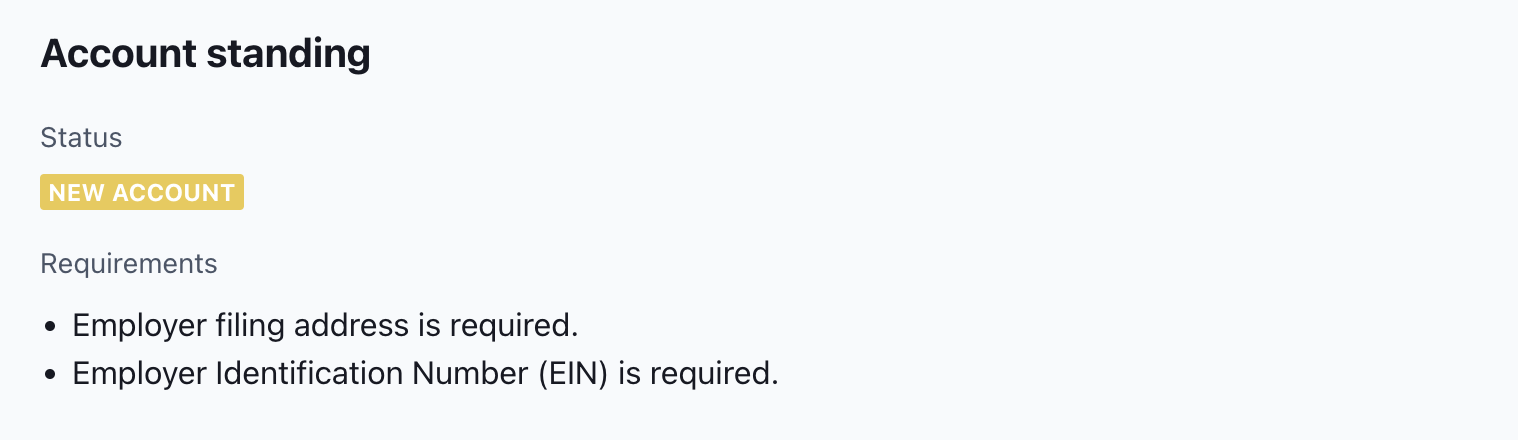
This is an example of account standing status as seen in the Salsa Dashboard under the employer profile.
Statuses
Use the following states to track an employer's account standing:
| Status | Description |
|---|---|
NEW_ACCOUNT | When an employer is created, they initially enter the NEW_ACCOUNT state and remain there until they complete all requirements necessary for Salsa to initiate KYB and AML processes. The necessary data to start these processes can either be collected directly from the employer using the onboarding component or imported using Paystream if it has already been gathered. |
IN_REVIEW | The account transitions to the IN_REVIEW status once it meets all new account requirements, at which point both the employer and their workers are screened and verified. Upon successful verification, the account moves to the ACTIVE status.
|
ACTIVE | Once approved and with no outstanding requirements, the employer’s account status is updated to an ACTIVE state where they can operate without restrictions.
|
CONDITIONAL | When an employer receives conditional approval, they enter the CONDITIONAL state while Salsa performs additional due diligence. During this period, there may be outstanding requirements for the employer or some workers. This status often applies to employers who have previously made payments to workers but have added new workers or undergone screenings that Salsa has marked as conditional. |
RESTRICTED | An account enters the RESTRICTED state if it has outstanding requirements that prevent the company from paying workers. In this situation, employers might receive a Request for Information (RFI) that is escalated to your customer support team. After the necessary information is submitted, Salsa reassesses the employer and their workers to potentially lift the restrictions. |
REJECTED | An account enters the REJECTED state if it operates at an extremely high risk level or within an industry that Salsa cannot serve. Although it is rare for companies to reach this state, the likelihood varies based on the industry vertical served and the volume of employers being onboarded. |
CANCELLED | An account enters the CANCELLED state if the employer's subscription was cancelled. |
The following is the typical account standing flow:
graph LR

%% Nodes
Employer_Created((Employer created))
NEW_ACCOUNT["NEW_ACCOUNT"]
IN_REVIEW["IN_REVIEW"]

RESTRICTED["RESTRICTED"]
CONDITIONAL["CONDITIONAL"]
ACTIVE["ACTIVE"]

REJECTED["REJECTED"]

%% Flow
Employer_Created --> NEW_ACCOUNT
NEW_ACCOUNT --> IN_REVIEW

%% Review outcomes
IN_REVIEW --> REJECTED
IN_REVIEW --> RESTRICTED
IN_REVIEW --> CONDITIONAL
IN_REVIEW --> ACTIVE

%% Restricted transitions
RESTRICTED --> REJECTED
RESTRICTED --> CONDITIONAL
RESTRICTED --> ACTIVE

%% Conditional transitions
CONDITIONAL --> RESTRICTED
CONDITIONAL --> REJECTED
CONDITIONAL --> ACTIVE

%% Active transitions
ACTIVE --> RESTRICTED
ACTIVE --> CONDITIONAL
ACTIVE --> REJECTED


%% Node styles
style Employer_Created fill:#6a1b9a,color:#ffffff
style NEW_ACCOUNT fill:#ffeb3b,color:#000000
style IN_REVIEW fill:#2196f3,color:#ffffff
style RESTRICTED fill:#f44336,color:#ffffff
style CONDITIONAL fill:#fbc02d,color:#000000
style ACTIVE fill:#8bc34a,color:#000000
style REJECTED fill:#000000,color:#ffffff


%% Theme-safe link styles
%% NEW_ACCOUNT
linkStyle 0 stroke:#d4c84a

%% IN_REVIEW
linkStyle 1 stroke:#4fa3e3

%% To REJECTED (neutral)
linkStyle 2 stroke:#9e9e9e

%% To RESTRICTED
linkStyle 3 stroke:#e57373

%% To CONDITIONAL
linkStyle 4 stroke:#e6c55a

%% To ACTIVE
linkStyle 5 stroke:#9ccc65

%% To REJECTED
linkStyle 6 stroke:#9e9e9e

%% To CONDITIONAL
linkStyle 7 stroke:#e6c55a

%% To ACTIVE
linkStyle 8 stroke:#9ccc65

%% To RESTRICTED
linkStyle 9 stroke:#e57373

%% To REJECTED
linkStyle 10 stroke:#9e9e9e

%% To ACTIVE
linkStyle 11 stroke:#9ccc65

%% To RESTRICTED
linkStyle 12 stroke:#e57373

%% To CONDITIONAL
linkStyle 13 stroke:#e6c55a
Related
- Employer Readiness — the operational gate that runs in parallel with Account Standing.
Updated 2 days ago