
Employer and Worker notification templates
Overview
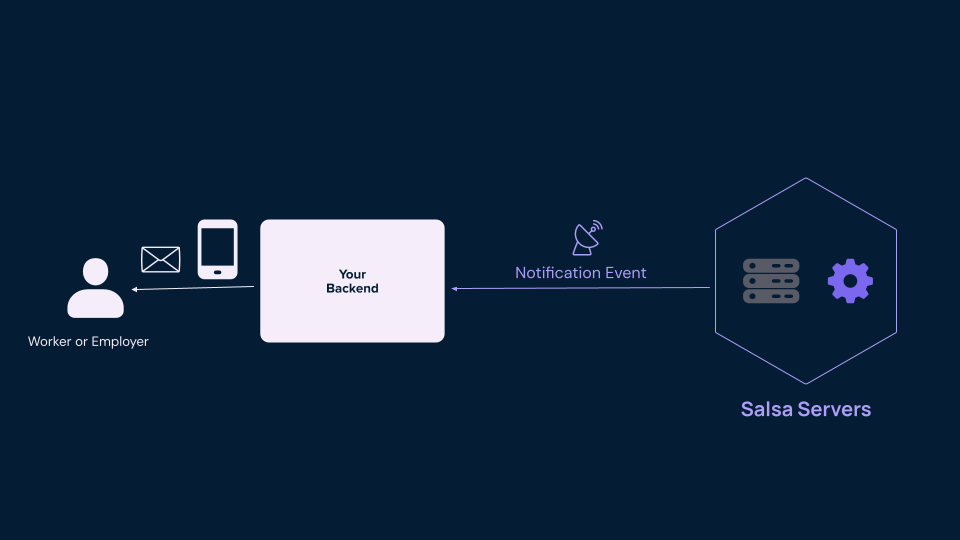
Notifications are essential to payroll products, as they help build confidence and ensure critical tasks are completed on time. Salsa generates webhook events to notify you of payroll activity in your account. By configuring your application to receive these events, you can craft timely messages that can be shared via email, text, or within the product. This allows you to control the delivery mechanism while we do the heavy lifting of computing the notifications.
Salsa generates two types of webhook events:
- LIFECYCLE: These events represent changes in the life-cycle of entities (create, delete, update), and they are designed to allow your platform to react to these changes and update your data or trigger new workflows. For example, a lifecycle event can be used to update your system with the Salsa ID when a new Employer is created.
- NOTIFICATION: These events represent payroll activity that we recommend notifying employers and workers about to provide the best possible experience and reduce inbound questions to your support team. For example, a notification event can be used to send a confirmation email to the employer after they confirm a payroll run. This message could include the total amount of the payroll run and the date it will be debited from their account so they can ensure the funds are there to cover it.
This guide focuses on notification-type events which will allow you to incorporate a comprehensive notification system with little effort.
Filtering notification events
To filter for notification-type events, you can leverage the NOTIFICATION category to filter all the events in this category. Notification-type events are also defined by the type (Notification.*).
Here is a dummy example of a notification-type event:
{
  "eventType": "Notification.ExampleEmployerPayrollUpdateNotification"
  "category": "NOTIFICATION",
  "subject": "Payroll Update Example",
  "htmlBody": "<p>Your payroll operation has been updated.</p>",
  "employerId": "er_example_employer_id",
  "workerId": "wr_example_worker_id",
  "moreFields": "..."
}
See the documentation on consuming webhooks to learn how to consume the notifications.
Ways to support notifications
Balancing speed and delivering the best experience possible for employers and workers is key and will inform how you decide to support notifications. The two strategies below can be combined to form a hybrid approach where you leverage out-of-the-box messages for edge case that don't occur regularly; and, at the same time, have some hand crafted messages that you own for the more common use cases.
Here are some details on the two options:
- Leverage the out-of-the-box message: It is the fastest and lighter way to craft notifications, you can use our default messages leveraging the fields
subjectandhtmlBodyincluded in the payload of everyNotificationevent. This approach eliminates the need to build a handler for each type of notification. To do this, write one handler for the webhook events with the categoryNOTIFICATIONand leverage the default subject and body message. - Craft your own messages: You can create custom messages from scratch if you want to add your own tone and personal touch. Below, we have included a set of templates you can use to understand the structure and information needed to compose an effective notification. Each event has all the variables needed to craft a great message.
Notifications
Here is a list of the different notifications that we recommend you send to your employers and workers to deliver a great payroll experience and reduce inbound questions to your support team.
This page is the source of truthThis page lists the notifications Salsa currently sends. You may occasionally see other
Notification.*event types in the GraphQL schema or the dashboard catalog — those are registered but not yet active, so appearing there doesn't mean an event is live. If a notification isn't documented on this page, don't build against it yet.
Bank authorization completed
| Intended for | Employer/business owner (admin user of payroll) |
| Description | This is a confirmation notification after the user signs the Pre-Authorized Debit (PAD) agreement. It is required for money movement compliance. |
| Time sent | When the bank Pre-Authorized Debit (PAD) is signed. |
| Webhook event type | Notification.EmployerBankAccount.paymentAuthorizationCompleted |
Subject:
Your Pre-Authorized Debit agreement is confirmedBody:
<p>Hi {{employer_name}} team,</p>

<p>Thanks for signing your Pre-Authorized Debit (PAD) agreement with Salsa Software Inc. We're confirming that we've accepted your agreement with the following details:</p>

<p>You’ve authorized Salsa Software Inc. to electronically debit your bank account, and if needed, credit your account to correct any errors. You’ve also agreed to waive pre-notification of debit amounts and confirmed that you don’t require advance notice before a debit is processed.</p>

<p><strong>Payment start date:</strong> {{payment_start_date}}<br>
<strong>Type of authorization:</strong> Business PAD</p>

<p><strong>Account to be debited:</strong><br>
Account name: {{account_name}}<br>
Bank: {{bank_name}}<br>
Account number: {{masked_account_number}}</p>

<p><strong>Authorized by:</strong><br>
Name: {{authorizer_name}}<br>
Email: {{authorizer_email}}<br>
Date signed: {{signature_date_time}}</p>

<p>If anything above looks incorrect, please contact us at <a href="mailto:[email protected]">[email protected]</a>.</p>

<p>Otherwise, you’re all set. Your pre-authorized debits will begin on the payment start date listed above. You can cancel your PAD agreement by giving at least 30 days’ notice before the next scheduled debit.</p>

<p>You also have the right to reimbursement if a debit does not comply with your agreement. For more information about your recourse rights, please contact your financial institution.</p>

<p>Thanks,<br>
Your Payroll Team at {{partner_name}}</p>
{{payment_start_date}} is date-only (e.g. "Jan 05, 2026"), while {{signature_date_time}} includes the time and time zone (e.g. "Jan 05, 2026 at 14:30 UTC").
For Canadian employers, the recourse sentence ends with " or visit www.payments.ca", which renders as a link to www.payments.ca.
Bank verification completed
| Intended for | Employer/business owner (admin user of payroll) |
| Description | This lets the employer know their bank account successfully completed verification. |
| Time sent | This is sent once the micro-deposit transaction amounts have been successfully verified within our system. |
| Webhook event type | Notification.EmployerBankAccount.microDepositVerificationCompleted |
Subject:
Your payroll bank account has been verifiedBody:
<p>Hi {{employer_name}} team,</p>

<p>Your bank account ending in {{masked_account_number}} has been successfully verified. You can now use this account to run payroll for {{employer_name}}.</p>

<p>If you didn’t recently try to link a bank account, please contact our support team.</p>

<p>Thanks,<br>
Your Payroll Team at {{partner_name}}</p>
Bank verification failed
Bank account verification through micro-deposits is intentionally designed to have safeguards in place to ensure the integrity of the process, failures like too many attempts or waiting too long to verify the bank account will require a new micro deposits to be sent in order to complete bank verification. The field failureCode from the event Notification.EmployerBankAccount.microDepositVerificationFailed can be utilized to distinguish different scenarios.
Only three failure codes trigger this webhook: MAX_ATTEMPTS_EXCEEDED, EXPIRED, and TRANSACTION_RETURNED. The REST schema lists six values, but the other three (DUPLICATE, CANCELLED, ACCOUNT_MODIFIED) are void codes that never fire the webhook.
Bank verification failed: Expired
| Intended for | Employer/business owner (admin user of payroll) |
| Description | This lets the employer know the test deposits have expired and they must start trigger new test deposits. This information would also be shown to the user when they log into the product. |
| Time sent | This is sent once the test deposits expire, which is 60 days after sending them. |
| Webhook event type | Notification.EmployerBankAccount.microDepositVerificationFailed |
| Failure code value | EXPIRED |
Subject:
Action needed: Your payroll bank account verification expiredBody:
<p>Hi {{employer_name}} team,</p>

<p>We sent two small test deposits to the bank account ending in {{masked_account_number}} that you added for {{employer_name}} to help verify that the details were correct. Those deposits should have appeared on your bank statement by {{deposit_date}}.</p>

<p>Since it’s been more than 60 days, the test deposits have now expired. To verify your bank account, please log in to your payroll account and send a new set of test deposits.</p>

<p>Once verification is complete, you’ll be able to use this account to pay your team.</p>

<p>Thanks,<br>
Your Payroll Team at {{partner_name}}</p>
Bank verification failed: Returned
| Intended for | Employer/business owner (admin user of payroll) |
| Description | This lets the employer know there was a problem with the test deposit verification process that needs their attention. This info would also be shown to the user if they were to log in to the product. |
| Time sent | This is sent once we detect that the test deposits failed to make it to the employer’s account or we were not able to debit the amount back. |
| Webhook event type | Notification.EmployerBankAccount.microDepositVerificationFailed |
| Failure code value | TRANSACTION_RETURNED |
Subject:
Action needed: Your payroll bank account verification failedBody:
<p>Hi {{employer_name}} team,</p>

<p>We tried to verify the bank account ending in {{masked_account_number}} that you added for {{employer_name}} by sending two small test deposits. Unfortunately, the verification was not successful due to an issue with the account information.</p>

<p>Please confirm the account details with your bank. Then log in to your payroll account and add a new bank account to continue the verification process.</p>

<p>Thanks,<br>
Your Payroll Team at {{partner_name}}</p>
Bank verification failed: Too many attempts
| Intended for | Employer/business owner (admin user of payroll) |
| Description | This lets the employer know they exceeded the number of times they entered the test deposit correctly, and they have to start new test deposits. |
| Time sent | This is sent once the user has exhausted the number of attempts allowed to enter the test deposit correctly. They have up to 5 times. |
| Webhook event type | Notification.EmployerBankAccount.microDepositVerificationFailed |
| Failure code value | MAX_ATTEMPTS_EXCEEDED |
Subject:
Action needed: Payroll bank account verification unsuccessfulBody:
<p>Hi {{employer_name}} team,</p>

<p>We weren’t able to verify the bank account ending in {{masked_account_number}} that you added for {{employer_name}}. The test deposit amounts entered didn’t match what was sent, and the maximum number of verification attempts has been reached.</p>

<p>To try again, please log in to your payroll account and send a new set of test deposits. You can also add a different bank account if the one on file is incorrect.</p>

<p>Once verification is complete, you’ll be able to use this account to pay your team.</p>

<p>Thanks,<br>
Your Payroll Team at {{partner_name}}</p>
Bank verification sent
| Intended for | Employer/business owner (admin user of payroll) |
| Description | This lets the employer know the test deposits have been processed and let’s them know when to expect them appearing on their bank statements. This will help them complete the bank account verification. |
| Time sent | This is sent once the test deposits are confirmed for delivery. This usually happens around 12am the first business day after the employer bank account is added. For example, if an employer bank account is added on Monday, this notification will happen that same evening around 12am Tuesday morning. |
| Webhook event type | Notification.EmployerBankAccount.microDepositVerificationSent |
Subject:
Test deposits sent — complete your payroll bank verificationBody:
<p>Hi {{employer_name}} team,</p>

<p>To verify your bank account, we’ve sent two small test deposits (each under $1) to the bank account ending in {{masked_account_number}} that you added for {{employer_name}}. These deposits should appear on your bank statement by {{deposit_date}}.</p>

<p>Once the deposits land in your account, please log in and enter the exact amounts to complete the verification process. This step is required before you can use the account to pay your team.</p>

<p>Thanks,<br>
Your Payroll Team at {{partner_name}}</p>
Employer funding failure
ACH debits to the employer bank account can fail due to multiple reasons; it is essential to notify users so they can work to solve the funding issue. The field returnCode in the event Notification.Payment.employerFundingFailedcan be used to distinguish between the different scenarios. To get a full list of return codes and the payment return lifecycle, please refer to this page
Employer funding failure: non-sufficient funds (NSF)
| Intended for | Employer/business owner (admin user of payroll) |
| Description | This let's the user know that we were not able to debit their bank account and that their payroll account will be on restricted status until we are able to recover the funds. |
| Time sent | When an employer funding failure happens due to non-sufficient funds. |
| Webhook event type | Notification.Payment.employerFundingFailed |
| Return code value | R01 |
Subject:
Payroll debit failed — ensure funds are available to re-attemptBody:
<p>Hi {{employer_name}} team,</p>

<p>We weren’t able to debit ${{debit_amount}} for your {{pay_date}} payroll from the bank account ending in {{masked_account_number}} due to insufficient funds.</p>

<p>Please ensure there are enough funds available. We’ll attempt the debit again soon. Until the funds are successfully recovered, your payroll account will be restricted from running payroll.</p>

<p>Thanks,<br>
Your Payroll Team at {{partner_name}}</p>
Employer funding failure: all other returns
| Intended for | Employer/business owner (admin user of payroll) |
| Description | This let's the user know that we were not able to debit their bank account and that their payroll account will be on restricted status until we are able to recover the funds. We need to be careful with the information disclosed. |
| Time sent | When an employer funding failure happens due to any return code other that the ones captured above. |
| Webhook event type | Notification.Payment.employerFundingFailed |
| Return code value | all other return codes |
There are return codes that shouldn't be disclosed to employers due to the potential leaking of critical information to fraudulent users. It is a small percentage of use cases but we need to think about it.
Subject:
Payroll debit failed — resolve bank issue to run payrollBody:
<p>Hi {{employer_name}} team,</p>

<p>We weren’t able to debit ${{debit_amount}} for your {{pay_date}} payroll from the bank account ending in {{masked_account_number}} due to an issue with the account.</p>

<p>Please contact your bank to confirm the account is active and able to receive payroll debits. Once resolved, you can update your bank details or let us know when you're ready to re-attempt the debit.</p>

<p>Until the issue is resolved, your payroll account will remain restricted from running payroll.</p>

<p>Thanks,<br>
Your Payroll Team at {{partner_name}}</p>
Employer funding re-debit
| Intended for | Employer/business owner (admin user of payroll) |
| Description | To be used when funds are owed due to payroll debit failure. |
| Time sent | This is sent when you have decided to initiate a debit for funds owed. Be sure to fill in information on what is being debited and when. |
| Webhook event type | Notification.Payment.employerFundingRescheduled |
Subject:
Your payroll debit has been rescheduledBody:
<p>Hi {{employer_name}} team,</p>

<p>We’ve rescheduled your payroll debit for {{employer_name}}. There’s no action needed on your part. We’ve taken care of everything to ensure payroll continues smoothly.</p>

<p><strong>Here’s what you need to know:</strong></p>

<ul>
  <li><strong>Payroll run:</strong> Dated {{pay_date}} with a total debit amount of ${{debit_amount}}</li>
  <li><strong>New funding date:</strong> {{debit_date}}, when the debit will be processed</li>
  <li><strong>Bank account:</strong> ending in {{masked_account_number}}</li>
</ul>

<p><strong>Why this happened:</strong> Sometimes we adjust funding dates to align with bank processing timelines or to ensure compliance with financial regulations.</p>

<p>If you have any questions or need help, feel free to contact us.</p>

<p>Thanks,<br>
Your Payroll Team at {{partner_name}}</p>
The bank account line is included only when maskedAccountNumber is present in the event.
Employer payroll operation
The Employer Payroll Operation webhook endpoint allows Salsa to send critical and time sensitive notifications. It's designed to request essential information needed to comply with tax regulations, such as missing SSNs, Business Contractors' EINs, or Tax IDs. Integrating with this endpoint will help ensure your payroll processing is accurate and compliant.
| Intended for | Employer/business owner (admin user of payroll) |
| Description | Request essential information from employers or workers for payroll processing. |
| Time sent | It varies depending on when tax operation notifications are triggered, typically before the end of a tax period when a tax payment is due or during quarterly tax filings. This notification cannot be customized as it is designed to be passed through leveraging the body and subject fields due to its variability. |
| Webhook event type | Notification.employerPayrollOperation |
Subject:
Missing Illinois Account NumbersMissing Kansas Withholding Tax IDMissing Rhode Island Account NumbersMissing State Account NumberBody:
Hi Spice Junction team,

Please provide your IL account numbers for both withholding and unemployment. You have a deposit due on Wednesday, Sept 25th, that we cannot send without your account number.

If you do not know your IL withholding account number, you can review any documents you've received from them and it will include your number or you can call the IL Dept of Revenue at 1-800-732-8866. For IL SUI, you can call the IL Department of Employment Security at 800 247-4984.

Thank you,
Payroll Support
Hi Spice Junction team,
Please provide your KS account number withholding tax. Your business has a deposit due on Wednesday, Sept 25th, that we cannot send without your account number.
If you do not know your KS withholding account number, you can review any documents you've received from them and it will include your number or you can call the KS Dept of Revenue at 785-368-8222 or reach the agency by email at [email protected].
Thank you,
Payroll SupportHi Spice Junction team,
Please provide your RI account numbers for both withholding and unemployment. You have a deposit due on Monday, Sept 23rd, that we cannot send without your account number.
If you do not know your RI withholding account number, you can review any documents you've received from them and it will include your number or you can call the State of Rhode Island, Division of Taxation at (401) 574-8829, option #3 or email at [email protected]. For RI SUI, you can call the RI Department of Labor and Training at (401) 574-8700.
Thank you,
Payroll SupportHi Spice Junction team,
Q3 2024 payments and filings are due soon, but we're missing some information from you. By October 8, please provide the missing account numbers for the taxes listed below to ensure successful tax payments and filings.
Pennsylvania Withholding
Pennsylvania Unemployment
If you have any questions, please reach out to our support team.
Thank you,
Payroll SupportEmployer re-debit cleared
| Intended for | Employer/business owner (admin user of payroll) |
| Description | To be used when re-debit for funds owed has cleared. |
| Time sent | This is sent when the re-debit to collect owed funds has cleared and the restriction on the account is removed. The user can go back to running payroll. |
| Webhook event type | Notification.Payment.employerFundingRedebitCleared |
Subject:
Payroll funding issue resolvedBody:
<p>Hi {{employer_name}} team,</p>

<p>The payroll funding issue for {{employer_name}} has been successfully resolved, and your account restriction has been lifted. You can now resume running payroll.</p>

<p><strong>Funding cleared date:</strong> {{cleared_date}}</p>

<p><strong>Bank account:</strong> ending in {{masked_account_number}}</p>

<p>If you have any questions or need help, feel free to contact us.</p>

<p>Thanks,<br>
Your Payroll Team at {{partner_name}}</p>
The bank account line is included only when maskedAccountNumber is present in the event.
Employer tax rate updated from agency
| Intended for | Employer/business owner (admin user of payroll) |
| Description | Notifies the employer when their state unemployment tax rate has been updated based on data received from the state agency. No action is required from the employer. |
| Time sent | When a tax rate is successfully updated from agency data during the SUI Rate Agency Data Exchange process. |
| Webhook event type | Notification.Employer.taxRateUpdatedFromAgency |
Subject:
Your state unemployment tax rate has been updatedBody:
<p>Hi {{employer_name}} team,</p>
<p>We've updated your state unemployment tax rate for {{jurisdiction_name}} using the latest information provided by the state agency.</p>

<p><strong>Here's what changed:</strong><br/>
<strong>Previous rate:</strong> {{previous_rate}}%<br/>
<strong>New rate:</strong> {{new_rate}}%<br/>
<strong>Effective date:</strong> {{effective_date}}</p>

<p>No action is needed on your part. We've already updated your account, and future payrolls will
reflect the new rate automatically.</p>

<p>If you receive a notice from the state with the same details, you can safely keep it for your records.</p>

<p>Thanks,<br/>
Your Payroll Team at {{partner_name}}</p>
Payday reminder
| Intended for | Employer/business owner (admin user of payroll) |
| Description | This is a reminder to run payroll before the cutoff date and time in order to get workers paid on time. |
| Time sent | Approximately two and a half days (62 hours) before the payroll run confirmation cutoff date |
| Webhook event type | Notification.employerPaydayReminder |
Subject:
Don’t forget to run payrollBody:
<p>Hi {{employer_name}} team,</p>

<p>This is a quick reminder that you have an upcoming payday on {{pay_date}} for {{employer_name}}.</p>

<p>Submit your payroll by {{cutoff_datetime}} to pay your team on time.</p>

<p>Thanks,<br>
Your Payroll Team at {{partner_name}}</p>
{{cutoff_datetime}} is rendered from the confirmBy field and shows the deadline in both Pacific and Eastern time.
The pay date can fall on a weekend or a bank holiday. In that casecanBeFulfilledisfalseand a separate template makes clear the pay date needs to change for direct deposit.unfulfillableReasonisWEEKENDorBANK_HOLIDAY, andsuggestedPayDate(optional) is the pay date Salsa recommends instead. If you are not consuming this template, implement similar logic from those fields.
Subject:
Heads up: Your next payday falls on {{closed_day}}Body:
<p>Hi {{employer_name}} team,</p>

<p>We wanted to remind you that you have a payday coming up on {{pay_date}} for {{employer_name}}.</p>

<p>Please note the payday falls on {{closed_day}}, when banks don’t process payments. If you’re paying your team via direct deposit, you’ll need to choose a different pay date.</p>

<p>{{guidance}}</p>

<p>Thanks,<br/>
Your Payroll Team at {{partner_name}}</p>{{closed_day}}isa weekendora bank holiday, fromunfulfillableReason. Some events persisted beforeunfulfillableReasonexisted carry a null value; for those, the phrase is inferred from the day of week ofpayDateinstead (a weekend day maps to "a weekend", any other day is assumed to be "a bank holiday" since the banking calendar isn't available at render time).{{guidance}}depends onsuggestedPayDate:
| Condition | Guidance text |
|---|---|
suggestedPayDate is earlier than payDate | Submit your payroll by {{cutoff_datetime}} to pay your team on {{suggested_pay_date}}. |
suggestedPayDate is later than payDate | An earlier pay date is no longer attainable by direct deposit. Submit your payroll by {{cutoff_datetime}} to pay your team on {{suggested_pay_date}}. |
No suggestedPayDate, or suggestedPayDate equal to payDate | Submit your payroll by {{cutoff_datetime}} to get your team paid on time. |
When suggestedPayDate equals payDate, there's no distinct replacement date to name, so the guidance falls through to the same text used when no suggestedPayDate is given at all.
When confirmBy is not set, "Submit your payroll by {{cutoff_datetime}}" becomes "Submit your payroll as soon as possible".
Payroll history required
| Intended for | Employer/business owner (admin user of payroll) |
| Description | This is a message to request prior payroll history so we can migrate past payments and complete the implementation phase of employer onboarding. |
| Time sent | This is sent once the employer indicates they have paid workers in the calendar year during the onboarding flow. It is sent only once. So if a user changes their answer multiple times, they don’t receive duplicates. |
| Webhook event type | Notification.employerPayrollHistoryRequired |
Subject:
We need your payroll history to finish setupBody:
<p>Hi {{employer_name}} team,</p>

<p>We’re almost there! Since you’ve already paid your team this calendar year, we’ll need your previous payroll history to finish setting up {{partner_name}} Payroll.</p>

<p>The easiest way to get started is by granting {{partner_name}} access to your previous payroll provider. It’s the fastest way to transfer your setup details and requires the least work from you.</p>

<p>If you prefer, you can also download the reports from your provider and send them over.</p>

<p>Once we have your history, we’ll take care of the rest so you can start running payroll with confidence.</p>

<p>Thanks,<br>
Your Payroll Team at {{partner_name}}</p>
Payroll run confirmation
| Intended for | Employer/business owner (admin user of payroll) |
| Description | This is a confirmation message that a payroll run was submitted successfully with a summary of the pertinent data |
| Time sent | Notification triggered by Salsa on the day that the payroll run was confirmed |
| Webhook event type | Notification.employerPayrollRunConfirmation |
Subject:
Payroll successfully submittedBody:
If any line item in the email template below has $0.00, don’t show the line item. This could be true for any one of the lines under “Summary” AND (while not common), this could be true for the last line that talks about the debit amount when an employer decides to pay all the workers by paper check instead of direct deposit and said workers are all contractors (i.e. there are no employer taxes to debit for).
When
maskedAccountNumberis present, the debit sentence reads “from your bank account ending in {{maskedAccountNumber}}”. When it is not present, the sentence reads “from your account” instead.
<p>Hi {{employer_name}} team,</p>

<p>Your payroll for {{employer_name}} has been successfully submitted for the period {{period_start}} to {{period_end}}.</p>

<p><strong>Here’s a summary:</strong></p>

<ul>
  <li><strong>Total contractor payments:</strong> ${{contractor_pay}}</li>
  <li><strong>Total employee payments:</strong> ${{employee_pay}}</li>
  <li><strong>Total employer payroll taxes:</strong> ${{employer_taxes}}</li>
  <li><strong>Total payroll cost:</strong> ${{total_cost}}</li>
</ul>

<p>We’ll debit ${{debit_amount}} from your bank account ending in {{masked_account_number}} on {{debit_date}}, and your team will be paid on {{pay_date}}.</p>

<p>Thanks,<br>
Your Payroll Team at {{partner_name}}</p>
Worker disbursement failure
ACH credits to the worker bank account can fail due to multiple reasons; it is essential to notify users so they can work to solve the banking issue. The field returnCode in the event Notification.Payment.workerDisbursementFailedcan be used to distinguish between the different scenarios. To get a full list of return codes and the payment return lifecycle, please refer to this page
| Intended for | Employer/business owner (admin user of payroll) |
| Description | This let's the user know that we were not able to credit their worker's bank account and that the funds will be refunded to their account. They should make plans to pay the worker outside the system. |
| Time sent | When a worker disbursement failure happens |
| Webhook event type | Notification.Payment.workerDisbursementFailed |
| Return code value | Any return code value |
Subject:
Worker payment failed - refund will be issuedBody:
<p>Hi {{employer_name}} team,</p>

<p>We couldn’t process the direct deposit of ${{amount}} for {{worker_name}} from your {{pay_date}} payroll. The issue is with their bank account ending in {{masked_account_number}}.</p>

<p>We’ll automatically refund the funds to your company bank account. Please make sure {{worker_name}} is paid directly.</p>

<p>Thanks,<br>
Your Payroll Team at {{partner_name}}</p>
Worker payday
| Intended for | Worker |
| Description | This is a notification to let the worker know they got paid and provides access to their earnings record |
| Time sent | Notification triggered by Salsa on the pay date |
| Webhook event type | Notification.workerPayday |
Subject:
You got paid — your paystub is readyBody:
<p>Hello {{worker_name}},</p>

<p>Your payday has arrived! Your latest paystub from {{employer_name}} is ready and covers the period from {{period_start}} to {{period_end}}.</p>

<p>Thanks,<br>
Your Payroll Team at {{partner_name}}</p>
Updated about 1 month ago