
Gather the information necessary to onboard an employer onto payroll by collecting it directly from them with this experience.
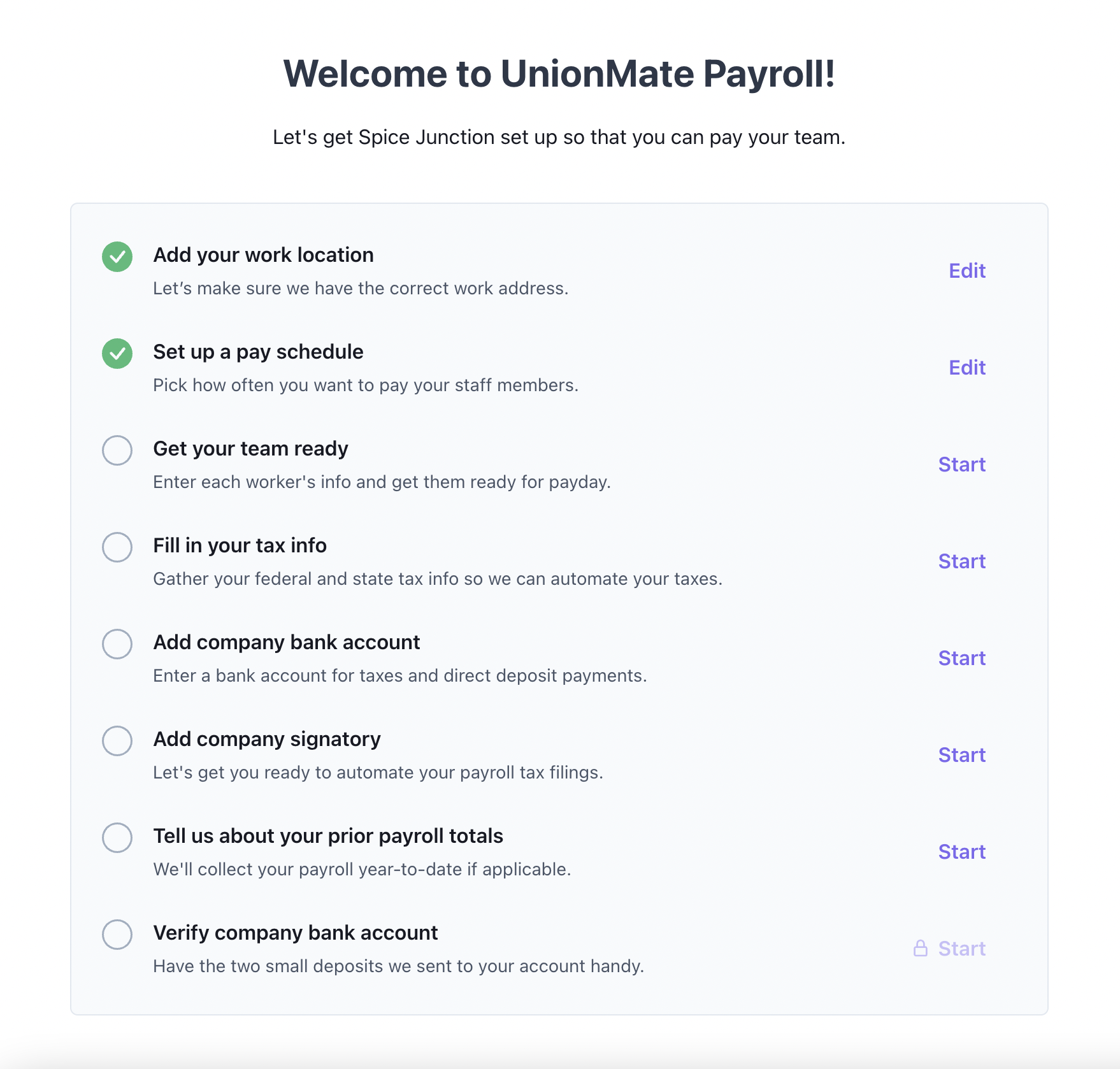
Employer onboarding experience
This is a employer facing experience that provides an employer user with a walkthrough of all of the steps that are required to be completed by them in order to get them setup and ready to run payroll.
Deciding whether to mount the element
On a returning employer's visit, check whether they still need onboarding before rendering this experience. Either:
- Query Salsa. If
onboardingSummary.completedAtis set on the employer, onboarding is done. - Track it yourself. Keep a lifecycle state on your own employer record (for example
onboarding → active), advanced by theEmployer.onboardingStatuswebhook described below. Most integrations prefer this: it avoids a call to Salsa on every page load, and gives you somewhere to represent states Salsa doesn't know about, such as cancelled or suspended, so your app can render those views too.
query EmployerOnboardingState($employerId: ID!) {
  employer(id: $employerId) {
    onboardingSummary {
      status
      completedAt
    }
  }
}
Completing onboarding is not the same as being ready to run payrollOnboarding completion means the employer finished the flow. It doesn't mean they can run payroll yet, and it doesn't mean their workers are set up. See Employer readiness and Worker payment readiness.
Embedded usage
Element name: employer-onboarding
Refer to the guide on how to embed an Element with Salsa.js for more detailed instructions.
Options
| Name | Type | Description |
|---|---|---|
userToken | String | Required. A User Token with EMPLOYER_ADMIN or EMPLOYER_ONBOARDING_ADMIN access role for the specified Employer. |
employerId | String | Required. The id of the Employer. |
includeSteps | String[] | An array of the names of the steps which are to be included in the list of onboarding steps. If omitted, all applicable steps will be included by default. Available steps are: add-company-bank, company-signatory, pay-schedule, payroll-history-declaration, tax-info, verify-bank, work-location, and worker-setup. |
Refer to the reference on creating elements for the additional options that are available to all elements.
Workforce-based step visibility
The onboarding steps displayed adapt based on the employer's workforce type:
| Workforce Type | Visible Signatory Step | Notes |
|---|---|---|
| Employees or Both | company-signatory | Full two-step flow: add signatory → sign documents |
| Contractors only | signatory-catch-all | Simplified single-step signatory form (replaces company-signatory and pay-schedule) |
When an employer has a contractors-only workforce, the company-signatory and pay-schedule steps are automatically hidden and replaced with the signatory-catch-all step, which collects the signatory information without requiring document signing.
🚨 Note: For contractors-only employers, the signatory-catch-all step is always required and cannot be hidden via the includeSteps option. The company-signatory step can be excluded for other workforce types, but the catch-all step will always appear and cannot be hidden by configuration.
Alternatively, if the platform supports admonition blocks, you could use:
:::warning
For contractors-only employers, the signatory-catch-all step is always required and cannot be hidden via the includeSteps option. The company-signatory step can be excluded for other workforce types, but the catch-all step will always appear when applicable.
:::
Example
salsa.elements.create('employer-onboarding', {
  userToken: 'eyJhbGciO...ajs0Wqw',
  employerId: 'er_e8343fc7-9d63-4cc5-81ed-c573fc666d37'
});
Events
Refer to the documentation on Element events for more information about events and instructions on how to consume them.
complete event
complete eventThe complete event is triggered when the user completes the onboarding workflow.
Event object properties
| Name | Type | Description |
|---|---|---|
elementType | String | 'employer-onboarding'` |
employerId | String | The id of the Employer. |
After completion
When onboarding completes, stop rendering this element and render the employer-dashboard element in its place. Two separate signals tell you it's done, and they reach different parts of your integration.
In the browser: the complete event above. The element emits it into your frontend. It does not reach your server. Use it to swap the component immediately:
const onboarding = salsa.elements.create('employer-onboarding', {
  userToken: 'eyJhbGciO...ajs0Wqw',
  employerId: 'er_e8343fc7-9d63-4cc5-81ed-c573fc666d37'
});

onboarding.on('complete', ({ employerId }) => {
  // stop rendering employer-onboarding, render employer-dashboard
});
On your server: the Employer.onboardingStatus webhook, sent with status: "COMPLETED". Salsa sends it as an HTTP request to an endpoint you register. It does not reach your frontend. Use it to update the employer's state in your own database. See Consuming webhooks to set up an endpoint, and the Employer.onboardingStatus event reference for the payload.
Embedded vs. hostedThe
Employer.onboardingStatuswebhook and thecompleteelement event are sent for embedded onboardings. For hosted onboardings, completion is tracked through theHostedEmployerOnboardingresource: itsstatusmoves throughINVITED,STARTEDandCOMPLETED(orINVALIDATEDif the link expires or a new onboarding replaces it), andcompletedAtis set once the employer finishes. Read it with Get HostedEmployerOnboarding, or useonboardingSummary.completedAton the employer as described in Deciding whether to mount the element.
Don't useEmployer.PayWorkersReadiness.statusChangedto detect completionReadiness tracks the employer's setup data, which can become complete while the user is still inside the flow adding workers. It may therefore fire before the user finishes onboarding. Use it for Employer readiness, not for swapping the UI.
Hosted usage
URL path: employer-onboarding
Refer to the guide on how to onboard employers with Salsa UI for more detailed instructions on how you can invite employers to use this hosted UI experience.
Options
| Name | Type | Description |
|---|---|---|
userToken | String | Required. A User Token with EMPLOYER_ONBOARDING access role for the specified Employer. |
id | String | Required. The id of the HostedEmployerOnboarding instance associated with a particular Worker. |
Example
https://components.salsa.dev/hosted/employer-onboarding?id=hsteronbrd_t56022031-54d25-20ce-m790-f0bb4078273&userToken=eyJhbGciO...ajs0Wqw